
By NameStylish · Last updated:
Type a name and copy a style
Each style appears under the box with a Copy button; the letters change, the spelling stays the same. Type a name, look through the styles grouped by look and tap the one you want: it is copied as plain text, ready to paste into a profile, a bio or an in-game name field.
- Type your name in the box at the top, for example “Arjun”, “ProZ” or “Zara”.
- Pick a style from the list: cursive, bold, small caps, italic, bubble and decorated combinations.
- Tap to copy and paste it where the name goes.
To go further than the letters, wrap the name in a symbol. Every symbol below is a plain Unicode character, so it pastes into a name field the same way a letter does; tap once to copy it.
Crown & royalty 24
King & throne 24
Fire & flame 24
Lightning & power 23
Swords & blades 24
Skull & bone 24
Devil & horns 24
Ghost & shadow 24
Dragon 24
Wolf & beast 24
Wings 24
Arrows & marks 24
Stars & shine 24
Hearts 24
Butterfly & soft 24
Letter styles and what they are made of
The table lists each letter style with a sample and the Unicode block its characters come from, so it is clear which styles are letters and which are symbols. Letter styles replace the Latin letters A–Z with look-alike characters, while frames and symbols are separate characters placed around the name.
| Style | Sample | Unicode block |
|---|---|---|
| Aesthetic cursive | 𝓩𝓪𝓻𝓪 | Mathematical Alphanumeric Symbols (bold script, from U+1D4D0) |
| Bold | 𝐙𝐚𝐫𝐚 | Mathematical Alphanumeric Symbols (bold, from U+1D400) |
| Bold italic | 𝙕𝙖𝙧𝙖 | Mathematical Alphanumeric Symbols (sans-serif bold italic, from U+1D63C) |
| Small caps | ᴢᴀʀᴀ | Phonetic Extensions (U+1D00, U+1D22) and IPA Extensions (U+0280) |
| Double-struck | ℤ𝕒𝕣𝕒 | Letterlike Symbols (U+2124) and Mathematical Alphanumeric Symbols (from U+1D538) |
| Symbol frame | ꧁༺ Zara ༻꧂ | Javanese (U+A9C1) and Tibetan (U+0F3A); the name inside stays plain letters |
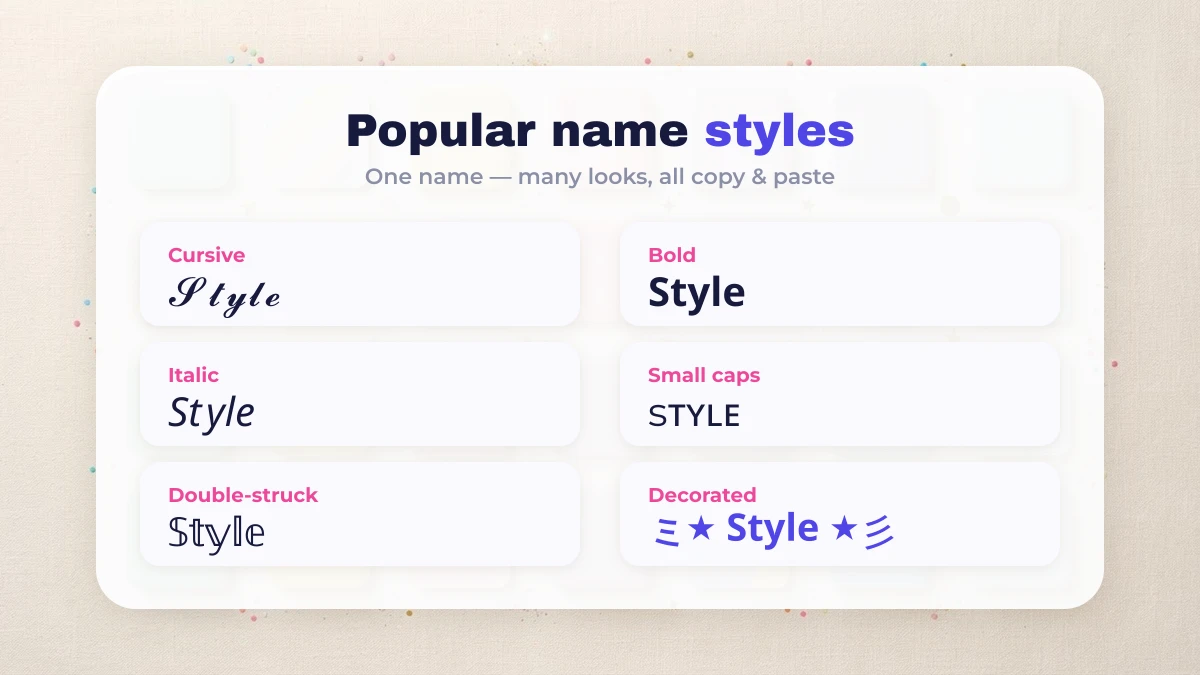
Styled names are text, not an installed font, so a display name, bio or in-game name accepts them while an @username or handle does not. When a field refuses a name outright, why a game refuses a styled name sets out the usual causes in the order to check them.
| Where you paste it | Styled Unicode works? |
|---|---|
| Instagram display name and bio | Yes |
| Instagram @username | No (letters, numbers, _ and . only) |
| Free Fire, MLBB and PUBG in-game name | Yes (most glyphs) |
| WhatsApp, imo and Yalla display name | Yes |
| TikTok display name | Yes |
| TikTok @username | No |
Names for apps and games
Yalla rooms, imo profiles and Mobile Legends each have their own page with names that fit those fields. Every app has its own length and character rules, which is why the names are grouped by app and why a name should always go into the display name or in-game name field, never the login handle.
- Free Fire: bold letters and symbols for the in-game name, with ready-made names on the Free Fire name style page.
- Mobile Legends: brackets and small capitals are common for squad tags, and the rename box is tight on characters; see MLBB in-game names.
- PUBG and BGMI: the clan tag field is four characters wide, so most styles overflow it; PUBG and BGMI clan tag names lists styles that fit.
- imo and Yalla: display names for chat and voice rooms, with profile and group names on the page of names for an imo profile.
- Instagram: styled text works in the display name and bio but never in the @username; the Instagram name style page has initial combinations and ready-made names.
- Bios and moods: a greeting line belongs in the bio, not the username, and welcome to my profile lines are written for that field. Attitude words for boys are on attitude name styles and soft ones for girls on stylish names for girls.
- Urdu and Hindi: Urdu is written right to left and Devanagari keeps its letters joined, so these scripts take frames rather than restyled letters; Urdu stylish names has framed examples.
| What you see | Likely reason | What to try |
|---|---|---|
| Empty boxes instead of letters | The phone or keyboard has no font for one of the characters | Paste the name into the target app and check it there before saving |
| A symbol disappears after saving | The name field filters part of the characters | Delete that one symbol and keep the styled letters |
| The name is refused outright | The styled name counts more characters than it shows | Try a shorter style, or a frame with fewer symbols |
NameStylish is an independent tool and is not affiliated with or endorsed by Garena / Free Fire, Moonton / Mobile Legends, PUBG / BGMI, imo, Yalla or Meta / Instagram. All product names are trademarks of their respective owners.